Warranty Claims Portal: What Manufacturers Actually Need for Effective Warranty Management

A warranty claim rarely arrives as a clean, structured request. It shows up as a blurry photo texted to a sales rep, an email that just says “these 12 are dead,” or a line scribbled on a delivery note that someone promises to log later. The claim itself isn’t the problem. The problem is that there’s no system sitting underneath it, so every claim becomes a small scavenger hunt across inboxes, spreadsheets, and someone’s memory.
For manufacturers and distributors handling warranties at any real volume, that gap gets expensive fast. A warranty claims portal closes it. Here’s what one actually does, what belongs inside it, and how to decide whether to build or buy.
Also read: B2B Portal Design Best Practices: What Actually Works for Manufacturers and Distributors
What a warranty claims portal actually is
A warranty claims portal is a shared system where claims are submitted, tracked, and resolved, with both sides looking at the same source of truth.
That “both sides” part is the whole point. A good portal is two-sided:
- The claimant side (contractors, dealers, installers, or end customers) is where claims get registered and tracked.
- The manufacturer side is where those claims are reviewed, approved or rejected, and measured.
Instead of a claim living in a rep’s inbox until it’s forgotten, it lives in a system where everyone can see exactly where it stands. No chasing, no “did you get my email,” no version of the spreadsheet that’s three days out of date.
The real cost of running claims on email and spreadsheets
Most warranty operations don’t break because the team is careless. They break because the tooling was never meant for the job. The usual symptoms:
- Claims go missing. An email gets buried, a text gets scrolled past, and a legitimate claim quietly dies. The customer remembers even when your system doesn’t.
- Nobody knows the status. “Is this approved? Who’s handling it? When did it come in?” If answering those takes a Slack thread and a phone call, you don’t have a process, you have a reaction.
- SLAs are invisible. You can’t hit a resolution target you aren’t tracking. Breaches only surface when a customer complains.
- Rejections turn into disputes. When a claim is denied and the reason lives in one person’s head, the contractor has no way to understand why, so every rejection becomes an argument.
- Bulk orders become a nightmare. A contractor orders 500 units and 40 fail. Handling that in a spreadsheet, product by product, is exactly where manual processes fall apart.
Also read: Digital Ordering System for B2B: Why Portals Are Revenue Infrastructure
What belongs in a warranty claims portal
This is where a portal earns its keep. The feature set below reflects what a genuinely useful warranty system needs, not a generic ticket tool with “warranty” written on top.
The claimant (contractor) side
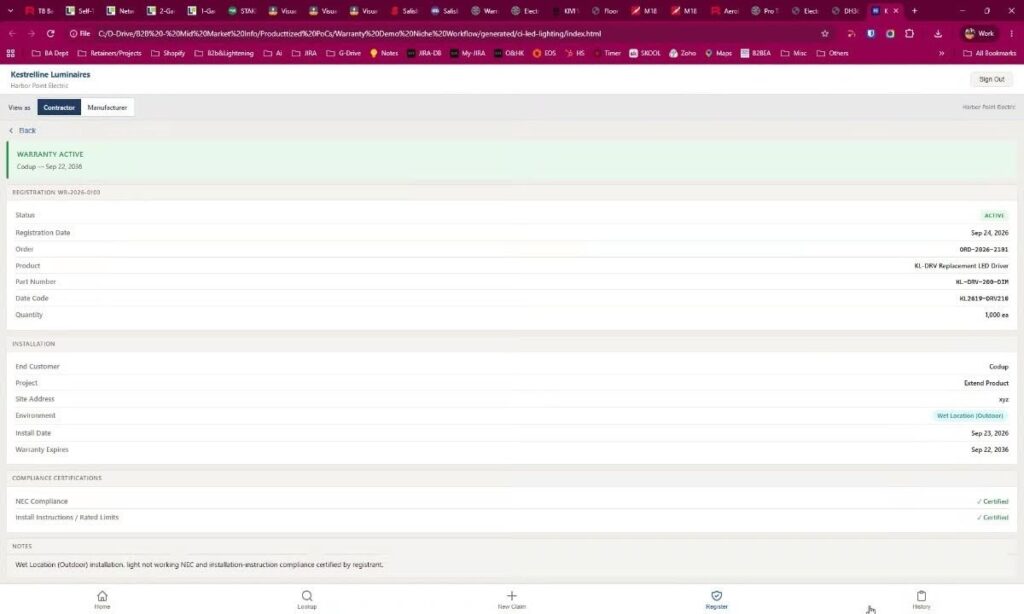
- A claims dashboard showing every claim they’ve filed, its current status, and the failure types logged, at a glance.
- Warranty lookup by order, part number, or SKU, so a contractor can instantly check whether a given product is still in active warranty before they even file.
- New claim submission that captures what actually matters: failure type, affected quantity, photos, and proof of purchase.
- Registration and history, so warranties registered against installed products are on record and the full claim history is one click away.
Also read: In B2B, Your Buyers Need More Than a Portal Stuck in the 90s
The manufacturer (admin) side
- A claim queue by status (open, awaiting return, under review, approved, rejected) so the team works from a prioritized list instead of a flooded inbox.
- Clear actions on every claim: approve, reject, request more information, or void the warranty.
- Rejection reasons recorded and visible to the claimant. If a claim is denied because it falls below a defined failure threshold, that reason shows up on the contractor’s side too. This single feature kills most warranty disputes before they start.
- SLA and resolution-time tracking, including breach monitoring, so service targets are measured instead of hoped for.
- Analytics that inform the business: claims broken down by failure type, by contractor, and by product, plus warranty-expiry tracking. That data tells you which products are failing, who’s filing the most claims, and where to fix the underlying issue.
The edge cases that break generic tools
Two scenarios separate a real warranty portal from a repurposed helpdesk:
- Bulk-order claims. When a contractor buys in volume and only a subset fails, the portal has to let them register claims per product and per quantity, not force a single all-or-nothing submission against the whole order.
- Failure thresholds. Many warranties only kick in past a defined failure rate (say, a minimum percentage of a batch). The portal should encode that logic, so eligibility is consistent instead of a judgment call that changes depending on who’s reviewing.
Getting these details right is the difference between a portal people actually use and one they route around.
Also read: 15 Real B2B Portal Examples That Improve Dealer and Customer Experience
Build vs. buy
There’s no universally correct answer here, and anyone who tells you otherwise is selling something.
Off-the-shelf warranty software gets you live quickly and covers standard claim flows well. If your warranty process is fairly generic and you don’t need deep ties into your other systems, a packaged tool can be the right call, and the cheaper one.
Where packaged tools tend to strain is on the specifics: your pricing tiers, your failure-threshold rules, your bulk-order logic, and, most of all, connecting warranty data back to the systems that already run your business. The moment your warranty workflow has to reflect rules unique to your products or feed data into your ERP, you’re either bending the business to fit the tool or paying for customization that eats the savings.
A custom portal makes sense when warranty handling is a real competitive or operational lever: when it needs to mirror your exact rules and slot into your existing stack rather than stand beside it. It costs more up front and buys you a system that fits instead of one you work around. Built the same way as a well-designed B2B dealer portal, it gives your partners self-service access and gives you control over every rule.
The honest framing: buy when your process is standard, build when your process is the product.
Also read: Custom API Integrations for B2B Commerce Workflows
Why integration is the whole game
Whichever path you choose, a warranty portal that sits in its own silo only solves half the problem.
The real value shows up when warranty data connects to the rest of your operation. Tie the portal into your ERP integration and claims reconcile against actual orders and inventory. Connect it to your commerce platform and warranty lookups pull from real product and pricing data instead of a static export someone updates manually. Link it to your service and returns flow, and an approved claim can trigger the replacement automatically.
A standalone portal cleans up how claims come in. An integrated portal cleans up the entire loop: from the claim, to the decision, to the replacement, to the data you use to stop those failures from happening again. That’s the version worth building.
Also read: When ERP Holds You Hostage: Solving ERP Integration Challenges for Scalable B2B eCommerce
The bottom line
Warranty claims will keep coming in as blurry photos and half-finished emails. That part you can’t change. What you can change is where they go next. A warranty claims portal turns that scattered stream of messages into a system: every claim visible, every decision recorded, every target measured. The claims stop vanishing, and the data starts working for you instead of against you.
FAQ
What is a warranty claims portal?
It’s a shared online system where warranty claims are submitted, tracked, and resolved. Contractors or customers file and monitor claims on one side, while the manufacturer reviews, approves or rejects, and measures them on the other, all from a single source of truth.
How is a warranty claims portal different from using email or spreadsheets?
Email and spreadsheets have no status tracking, no SLA monitoring, and no shared visibility, so claims get lost and rejections turn into disputes. A portal gives both sides real-time status, records rejection reasons, and tracks resolution times automatically.
Should we build a custom warranty portal or buy off-the-shelf software?
Buy when your warranty process is standard and doesn’t need deep integration. Build when your process involves rules specific to your products, like failure thresholds or bulk-order logic, or needs to connect tightly with your ERP and commerce systems.
Can a warranty claims portal handle bulk orders?
A well-built one can. It should let contractors register claims per product and per quantity when only part of a large order fails, rather than forcing a single submission against the whole order.
Why does ERP integration matter for warranty claims?
Integration lets claims reconcile against real orders and inventory, pull accurate product and pricing data, and trigger replacements automatically, turning the portal from a claims inbox into a closed operational loop.
Ready to simplify warranty management? Explore our Dealer & Customer Portal Services or Contact Us to build a portal that fits your exact workflow.