Shopify NetSuite Connector vs. Custom Integration: Which One Do You Need?
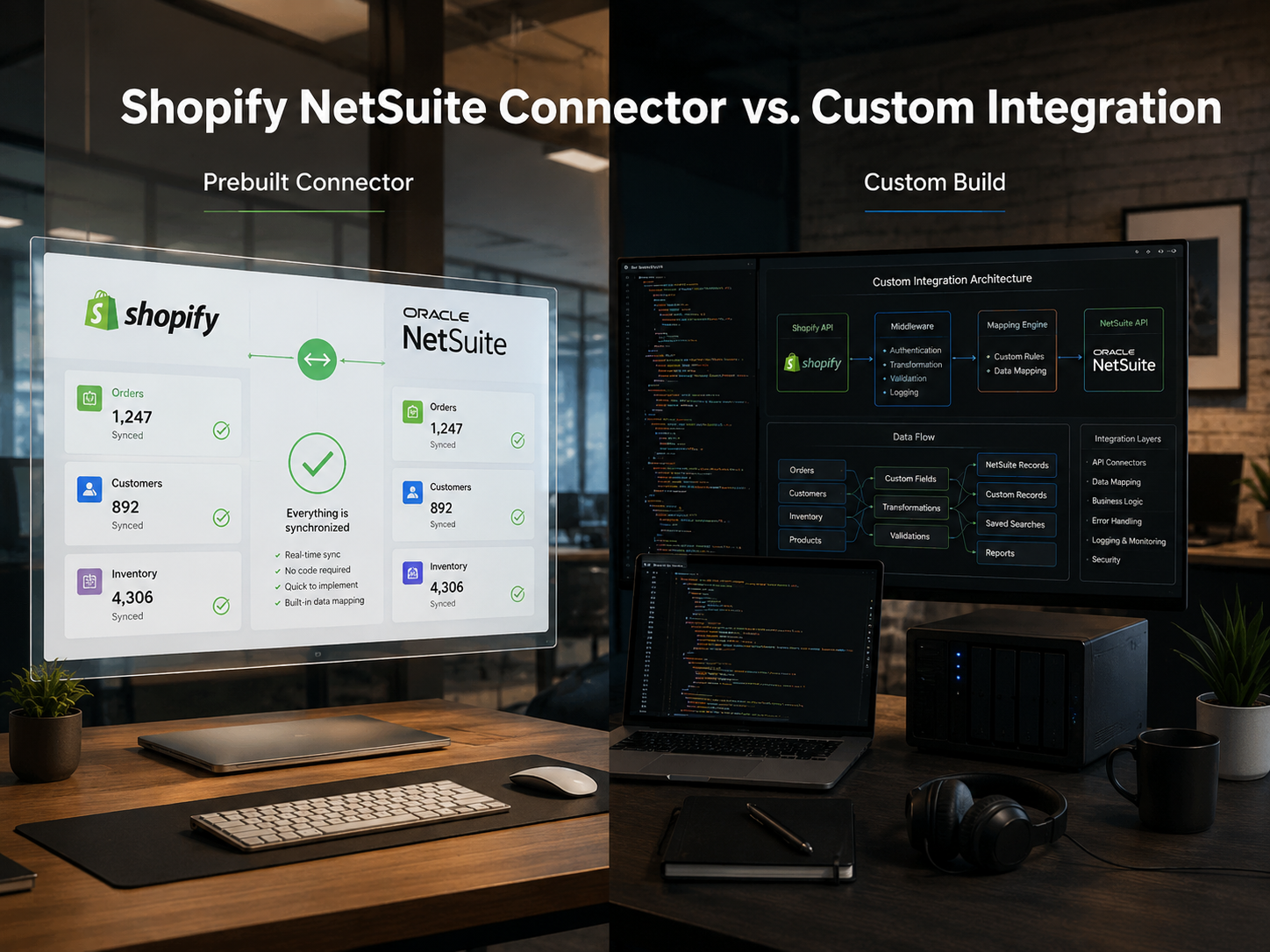
Shopify NetSuite Connector vs. Custom Integration: Which One Do You Need?
Ask five people whether you should connect Shopify to NetSuite with an off-the-shelf connector or a custom build, and you’ll get five answers — usually reflecting what each person sells.
The honest answer is that neither one is universally right. A pre-built connector can be the smartest, fastest decision one business makes, and the exact thing that quietly caps another. The difference doesn’t come down to budget or company size. It comes down to a single question: how much of your order-to-cash process looks like everyone else’s, and how much of it is yours?
If your flows are standard and your NetSuite instance is close to stock, a connector will likely serve you for years. The moment your business logic stops fitting a template, the math changes fast.
This guide breaks down the difference between Shopify Netsuite Connector vs Custom Integration so you can make the right decision.
The Short Answer
Choose a pre-built connector if your order-to-cash flows are standard and your NetSuite instance runs close to out-of-the-box. For most B2C stores and simpler B2B operations, a connector like Celigo or Boomi maps the common flows without the cost or timeline of a custom build.
Choose a custom integration if your business logic doesn’t fit a template. Customer-specific pricing, payment terms and credit limits, quote-to-order flows, multiple subsidiaries, a heavily customized NetSuite, or high order volume are the signals that a connector will eventually force you into manual workarounds and paying to work around the tool you’re paying for is the moment custom stops being the expensive option and starts being the cheaper one.
Most businesses know which description fits them within the first sentence.
Also read: How to Integrate B2B eCommerce with ERP Systems
What Each Option Actually Means
Before comparing them, it’s worth being precise about what sits behind each label — because people use both “connector” and “custom” loosely.
A pre-built connector is a templated, vendor-maintained integration. Tools like Celigo, Boomi, Jitterbit along with NetSuite’s own connector options sit between Shopify and NetSuite and come with the standard data flows already mapped. You configure it rather than build it, you pay a recurring subscription, and when Shopify or NetSuite changes an API, the vendor is responsible for keeping the integration working. You’re buying a maintained product with proven defaults.
A custom integration is built directly against the platforms’ APIs and Shopify’s Admin API and webhooks on the other. Nothing is pre-mapped, which is precisely the point: every flow, field mapping, business rule, and error-handling path is defined to match how your business actually runs. You’re not configuring a product, you’re building exactly the integration your operation needs, and you own it.
The distinction isn’t “easy vs. hard” or “cheap vs. expensive.” It’s configuring a maintained template vs. building to your exact logic and which of those you need depends entirely on how standard your logic is. Which is what the next section makes concrete.
What a Shopify–NetSuite Integration Does
To judge whether a connector is enough, you have to look at what the integration is actually moving between the two systems — because “connect Shopify to NetSuite” hides a lot of moving parts.
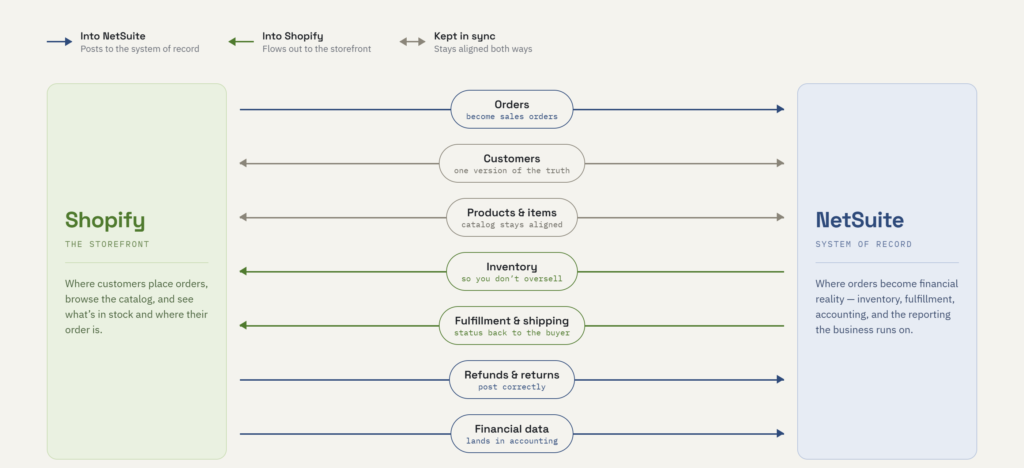
At the core, a handful of flows do most of the work. Orders placed in Shopify become sales orders in NetSuite.
Customer records sync so you’re not maintaining two versions of the truth.
Products and items stay aligned across both systems.
Inventory levels flow from NetSuite back to Shopify so you’re not overselling.
Fulfillment and shipping status flow back to Shopify so customers know what’s happening. Refunds and returns post correctly.
And the financial data, the reason NetSuite is in the picture at all, lands where accounting needs it.
For a straightforward store, those flows are genuinely standard, and a templated connector maps them well.
The complexity doesn’t live in the flows themselves, it lives in the rules attached to them.
That’s where the picture changes, and it changes most for B2B operations. Consider what a template has to accommodate once your business isn’t simple:
- Customer-specific and contract pricing — the same SKU priced differently per customer, tier, or negotiated agreement, rather than one public price.
- Payment terms and credit limits — orders that post on net-30/60/90 terms, against credit limits NetSuite has to check and enforce.
- Quote-to-order flows — deals that start as a quote, get approved, and convert to an order, rather than a straight checkout.
- Multiple ship-to locations — a single account ordering to many destinations, each needing its own address and tax treatment.
- Multi-subsidiary and multi-currency — orders routing to the right subsidiary, in the right currency, under the right tax rules.
None of these are exotic, they’re everyday reality for manufacturers, distributors, and wholesalers running B2B commerce on Shopify and NetSuite.
But every one of them is a place where a pre-mapped template either bends to fit or it doesn’t.
Also read: Is Shopify Plus Worth It? A Detailed Analysis
Where a Pre-Built Connector Is the Right Call
It’s easy to frame custom as the “serious” option and connectors as the compromise. That’s a mistake and an expensive one if it pushes you to build something you didn’t need.
For a large number of businesses, a connector isn’t the fallback. It’s the correct answer.
The biggest advantage is time-to-value. A connector’s standard flows are already mapped, so you’re configuring and testing rather than architecting from scratch.
What might be a multi-month custom build can be a matter of weeks — sometimes less — which matters when you need Shopify and NetSuite talking to each other now, not next quarter.
The upfront cost is lower for the same reason. You’re paying a subscription for a maintained product instead of funding an engineering project, which keeps the initial investment predictable and the barrier to entry low.
Then there’s maintenance you don’t own. Shopify and NetSuite both evolve their APIs. When they do, keeping the integration working is the vendor’s problem, not yours — no scramble on your side when something upstream changes. For a team without engineering capacity to spare, that offloaded responsibility is worth a great deal.
And the templates are proven. The standard order-to-cash path has been run across thousands of implementations. That maturity means fewer surprises on the flows that most businesses share.
Put simply: if your operation runs standard order-to-cash on a standard NetSuite instance, a connector gives you a reliable integration without the cost, timeline, or ownership burden of building your own. In that situation, custom is overkill.
That’s the honest case for connectors. The reason it isn’t the whole story is that “standard” has an edge, and some businesses live right on it, or well past it. That’s the next section.
Also read: Best CPQ Platforms for Epicor ERP Integration (2026)
Where a Pre-Built Connector Starts to Break
A connector works beautifully right up until your business asks it to do something the template didn’t anticipate. And the further you get from a standard operation, the sooner that moment arrives.
The first crack is usually custom field mappings. Your business tracks something the template doesn’t have a slot for like a custom field on the order. Some connectors allow a degree of custom mapping; most have a ceiling, and you find it exactly when you need to go past it.
Then there’s non-standard business logic. Templates encode assumptions about how an order should flow. The moment your process has rules specific to your business, you’ll start bending a fixed path into a shape it wasn’t built for.
The problem compounds when you’re running a heavily customized NetSuite. If your instance leans on custom records, SuiteScript workflows, and bespoke processes — which any mature NetSuite deployment eventually does — a template built for a generic instance simply can’t see most of what makes yours yours. The integration ends up syncing the surface while your actual logic sits untouched underneath.
For B2B operations, the sharpest break is around B2B-specific flows. A dealer and distributor portal is only as good as the data behind it: if a buyer logs in and sees generic pricing instead of their negotiated rate, or places an order that ignores their credit terms, the integration hasn’t served the business.
Multi-subsidiary complexity stretches things further. Routing orders to the correct subsidiary, in the correct currency, under the correct tax treatment, is a level of conditional logic most templates handle partially at best.
And underneath all of it sits performance at volume. A connector comfortable at a few hundred orders a day can strain when that becomes thousands, or when a flash sale sends a spike through both systems at once. Sync delays and failures tend to show up at peak load.
Individually, any one of these has a workaround. That’s the real trap. You add a manual step here, a scheduled export there, a spreadsheet reconciliation to catch what the sync misses and you end up paying for the connector and staff hours to patch around it.
Also read: Custom Middleware For System Integrations – The Essential Layer For Seamless, Unified Commerce
Where a Custom Integration Earns Its Cost
When your business logic is genuinely non-standard, custom integration earns its place.
What you gain: any business rule you can define, the integration can execute.
B2B-ordering flows are handled properly rather than worked around.
You control error handling, retries, and how failures are caught, so problems surface cleanly instead of silently.
And it scales with your NetSuite. The more customized your instance, the more a custom integration pays off, because it’s built to your actual records and workflows, not a generic version of them.
What it costs, honestly: the upfront investment is higher and the timeline longer, because you’re building rather than configuring.
You own the maintenance and when APIs change, keeping it working is on you or your engineering partner.
And it’s only as good as the engineering behind it: a custom integration built well is an asset for years; built poorly, it’s a liability you now owe.
Being straight about that is the point that custom is the right call when the logic demands it, not by default.
The Decision Framework: Which One Do You Need?
Strip away the sales pitches and it comes down to a few honest questions about your business. Map yourself against this:
| Factor | Lean connector | Lean custom |
| Business logic | Standard order-to-cash | Non-standard / B2B rules |
| NetSuite customization | Close to stock | Heavily customized |
| Selling model | B2C / simple B2B | Complex B2B, dealer/distributor |
| Entities | Single | Multi-subsidiary / multi-currency |
| Order volume | Low to moderate | High / performance-sensitive |
| Budget lens | Lower upfront cost | Lower long-run cost of ownership |
| Rate of change | Stable flows | Frequently evolving logic |
If your answers sit mostly in the left column, a connector will likely serve you well — don’t overbuild. If they sit mostly on the right, a connector will fight you, and custom is the sounder investment.
How Codup Approaches Shopify–NetSuite Integration
We don’t sell connectors, and we don’t sell custom builds. We build whatever your order-to-cash process actually requires — which means the first conversation is about your flows and your NetSuite instance, not our recommendation.
That order matters. An agency that only builds custom will always find a reason you need custom. A connector reseller will always find a reason the template fits. We’ve implemented both often enough to tell you plainly when a connector is genuinely enough — and we’d rather say that than take on a build you didn’t need.
And because we work across platforms rather than for one, what we recommend isn’t shaped by what we happen to be certified in. If your logic fits a connector, we’ll tell you which one and help you configure it properly. If it doesn’t, we’ll show you exactly where it breaks before you find out in production.
Or If you’re weighing this decision — or you already know your connector isn’t keeping up — let’s map your actual flows and rules first.
Also read: Custom API Integrations for B2B Commerce Workflows
Frequently Asked Questions
Can you use a connector and custom code together?
Yes — and it’s a common, pragmatic setup. A connector handles the standard flows while custom extensions or a middleware layer carry the logic the template can’t reach, such as contract pricing or non-standard order routing. You get the connector’s speed on the common path and custom precision only where your business actually needs it.
How long does a custom Shopify–NetSuite integration take?
The timeline depends on the integration’s complexity, including the number of flows, the level of customization in your NetSuite instance, and the amount of B2B logic you need to support. A focused build takes less time than a full multi-subsidiary, contract-pricing integration. The right way to scope it is to map your actual data flows and rules first, rather than starting from a generic timeline.
Is NetSuite’s own connector enough for Shopify?
For standard order-to-cash on a near-stock NetSuite instance, it can be. The limits show up the same way any template’s do — custom field mappings, non-standard logic, and B2B-specific flows like tiered pricing and payment terms. Whether it’s enough comes down to how far your business sits from a standard operation.
Does a pre-built connector handle B2B pricing and payment terms?
Sometimes partially, rarely fully. Customer-specific pricing, credit limits, and quote-to-order approvals are exactly where templates tend to hit their ceiling, because most assume a single public price and a straight checkout. If these flows are core to how you sell, they’re the clearest signal to look hard at custom.
What’s the real cost difference between the two?
Not what it looks like on day one. A connector’s lower upfront cost has to be weighed against overage fees and the staff hours spent working around its limits, while a custom build’s higher upfront cost comes with no ceiling forcing manual labor as you scale. The honest comparison isn’t which costs less to start — it’s which costs less to own over three to five years.
Need a custom eCommerce Integration? Schedule free consultation today.