Custom Middleware For System Integrations – The Essential Layer For Seamless, Unified Commerce

If you’re running a B2B business today, you’re not relying on just one system, you’re juggling a whole stack of them: CRM, ERP, Marketing Tools, and more.
And somewhere in the mix, you’ve probably got legacy systems still holding critical data.
While each tool does its job well on its own, the real problem is to get all of them to work together.
Imagine a customer placing an order for a product that is out of stock because the Inventory system was out of sync with the online store. These problems are common and cause disruption in the customer experience.
A seamless experience on the frontend is only translated by an ecosystem of well connected tools on the backend that all talk quickly and smoothly to each other, without anything lost in translation.
That’s where custom middleware comes in.
Middleware is basically the behind-the-scenes engine that makes your systems actually work together. It sits in the middle, translating data, routing it where it needs to go, and making sure everything stays in sync.
Think of it like this:
- It’s a translator that makes sure systems speak the same language
- It’s an orchestrator that keeps everything moving in the right order
Without custom middleware, you’re stuck with fragile integrations and a growing pile of custom code that becomes harder to manage over time.
The Integration Problem: Why Systems Don’t Naturally Work Together
On paper, connecting systems sounds simple.
You’ve got data in one place, another system that needs it, and an API to move it across. Done, right?
Not quite.
The reality is, most systems weren’t built to work together. They were built to solve specific problems and they all do it differently.
For starters, they don’t even speak the same language.
One system might send data as a CSV file, another expects JSON, and a third is built around XML. Even when they’re technically “connected,” the data doesn’t line up the way it needs to.
Then there’s architecture.
Some systems are modern and API-first. Others are legacy, rigid, and weren’t designed for real-time communication. Trying to make them work together often feels like forcing two completely different worlds to sync.
And even if you get past that, there’s business logic.
What counts as a “customer” in your CRM might not match how your ERP defines it. Pricing, statuses, workflows, every system has its own rules. So even when data moves between them, it can still be wrong or incomplete.
This is where a lot of teams hit a wall.
Because APIs don’t actually solve these problems.
They expose data, but they don’t:
- Transform it into the right format
- Align it with business rules
- Coordinate what happens next across multiple systems
So you end up with systems that are technically connected… but still not working together.
Seamless integration is about compatibility and orchestration, not just connecting tools together.
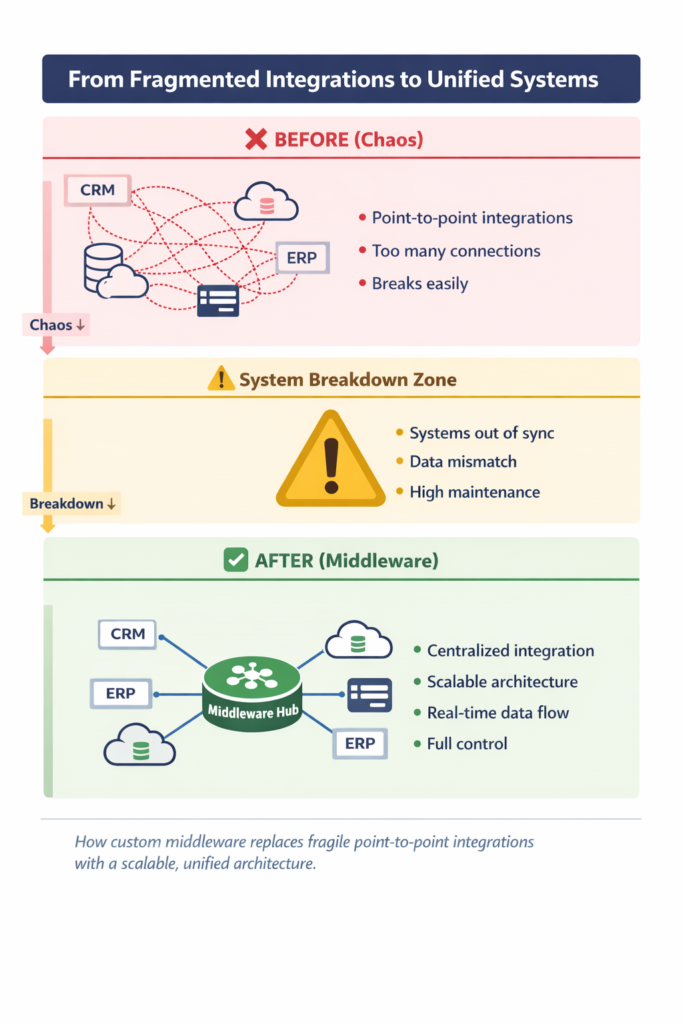
The Breaking Point: Why Point-to-Point Integrations Fail at Scale
When businesses first start connecting systems, the easiest approach is usually point-to-point integration.
You’ve got System A and System B—so you write some custom code to connect them directly. It works, it’s quick, and for a while, it feels like the right solution.
Then you add another system.
Now System A connects to B and C. Then B connects to C. Everything still works… just a bit more complex.
But this is where things start to snowball.
Let’s break it down:
- With 3 systems, you only have a handful of connections
- With 10 systems, you’re suddenly managing 45+ connections
And every new system you add multiplies that complexity.
Now imagine what happens when:
- One system changes its API
- A data format gets updated
- A workflow needs to be adjusted
You’re not fixing one connection—you’re fixing multiple. Sometimes dozens.
This is where point-to-point setups start to fall apart.
The problems show up fast:
- Hard to scale → every new system adds exponential complexity
- High maintenance → updates ripple across multiple integrations
- Fragile architecture → one change can break several connections
- Dependency chaos → systems become tightly coupled and hard to untangle
Over time, what you end up with is something teams know all too well:
Spaghetti architecture.
The Three Layers of System Integration For Seamless, Unified Commerce
When people talk about “integration,” they usually think it’s just about connecting systems.
But in reality, there are three different layers involved—and most solutions only handle one or two of them.
That’s why things often feel “connected,” but still don’t actually work the way they should.
Let’s break it down simply:
Transport Layer (Basic Connectivity)
This is the most basic level.
It’s just about getting systems to talk to each other—sending data from one place to another using APIs, protocols, or messaging.
Think of it as:
“Can System A send data to System B?”
Most tools stop here.
Data / Content Layer (Making Data Understandable)
Now that data is moving, the next question is:
“Does the receiving system actually understand it?”
This layer handles:
- Data formats (JSON, CSV, XML)
- Field mappings
- Data meaning (what “customer,” “order,” or “price” actually represent)
Without this, data might arrive—but still be useless or incorrect.
Business Process Layer (Making Everything Work Together)
This is where real integration happens.
It’s not just about data—it’s about what happens with that data.
This layer manages:
- Multi-step workflows
- Business rules
- System-to-system coordination
For example:
A new order comes in → check inventory → create invoice → notify shipping
That entire flow lives here.
True integration only happens when all three layers work together.
And this is exactly where custom middleware stands out. It handles all of them in one place.
What Is Custom Middleware & How It Actually Works
At its core, custom middleware is a tailored, API-driven integration layer that sits between your systems and manages how they interact. It’s designed specifically around your setup, not a generic template, so it aligns with how your business actually runs.
Instead of forcing your workflows into a rigid tool, it adapts to:
- Your business processes
- Your data structure
- Your mix of systems (modern + legacy)
That’s why it works so well in complex environments.
Because it becomes the missing layer between your systems and your operations, the piece that actually makes everything run as one.
So, How Does It Work in Practice?
You can think of custom middleware as a central layer that takes care of everything your systems can’t do on their own.
Here’s what it handles:
- Data Translation
Every system handles data differently.
Middleware takes incoming data, transforms it into the right format, and makes sure the receiving system can actually use it. No mismatches, no broken fields.
- Routing (Where Data Goes)
Not all data needs to go everywhere.
Middleware decides where information should go—based on your business rules. Whether it’s updating your ERP, notifying your CRM, or triggering another system, it all happens from one place.
- Orchestration (What Happens Next)
Most processes involve multiple steps.
Middleware manages that flow:
- A deal closes
- An invoice is created
- Inventory is updated
- Finance is notified
Instead of systems trying to coordinate this themselves, middleware handles the entire sequence.
- Monitoring & Logging
Everything is tracked.
You can see what data moved, where it went, and what happened at each step. If something fails, it’s logged, flagged, and can be retried with no more silent errors.
What’s Happening Behind the Scenes
Under the hood, this is powered by a few key components working together:
- Connectors / APIs → handle communication with each system
- Transformation layer → standardizes and maps data
- Orchestration engine → manages workflows and logic
- Routing logic → directs data based on rules
- Monitoring layer → tracks performance and issues
And to make everything reliable at scale, custom middleware also supports:
- Asynchronous processing → systems don’t have to wait on each other
- Safe retries (idempotency) → no duplicate or broken data
- Transaction handling → processes either complete fully or roll back cleanly
When all of this is put together, you get a controlled, reliable integration layer that can handle real business complexity without falling apart as you grow.
Messaging & Communication Models of Custom Middleware
Now let’s look at how systems communicate once middleware is in place.
Producer–Consumer Model (Decoupled Communication)
This is one of the most common patterns.
- One system (the producer) sends data
- Another system (the consumer) receives it
- Middleware sits in between
The key advantage is that they don’t need to know anything about each other.
They just send and receive data through the middleware layer.
Message Broker (Queue-Based Systems)
Instead of sending data directly, middleware can store it in a queue.
So if the receiving system is:
- Down
- Slow
- Or temporarily unavailable
The data doesn’t get lost.
It just waits until the system is ready.
This also allows for asynchronous processing, meaning systems don’t have to respond instantly.
Point-to-Point vs Publish–Subscribe
There are two main ways data gets shared:
- Point-to-Point → One sender, one receiver
- Publish–Subscribe → One sender, multiple receivers
In publish–subscribe, systems can “subscribe” to certain events (like new orders or updates) and automatically receive them when they happen.
This is especially useful in larger, more dynamic environments.
Custom Middleware vs Other Integration Approaches
| Approach | Best For | Strengths | Limitations | When It Breaks |
| Point-to-Point (Custom Code) | Simple, small-scale integrations | Full control, highly customizable | Hard to scale, high maintenance, tightly coupled systems | As soon as you add more systems (complexity explodes) |
| iPaaS (Integration Platforms) | SaaS integrations, quick automation | Fast setup, pre-built connectors, low-code/no-code | Limited flexibility, struggles with complex logic, vendor constraints | When workflows get complex or need customization |
| ESB (Enterprise Service Bus) | Large enterprises, legacy system integration | Centralized control, strong governance | Heavy, complex, slow to adapt, expensive to maintain | In fast-moving, cloud-first environments |
| Custom Middleware | Complex, mission-critical integrations | Fully tailored, scalable, flexible, high control, reliable | Requires upfront development effort | Designed to scale—doesn’t “break,” evolves with your systems |
Custom Middleware in Unified Commerce
Unified commerce brings together all your systems, data, and workflows so everything works in sync.
Custom middleware enables three things that make unified commerce actually work:
Real-Time Operations
In B2B, timing matters.
Inventory, pricing, orders, customer data—these things need to stay updated across systems without delays. Custom middleware makes that possible by ensuring data moves instantly (or exactly when it needs to), without bottlenecks.
Seamless Customer Experience
Your customers don’t care about your internal systems.
They expect:
- Accurate data
- Smooth processes
- Consistent interactions
Custom middleware makes sure everything behind the scenes stays aligned—so the experience feels seamless on the front end.
Single Source of Truth
One of the biggest problems in growing businesses is conflicting data.
Different teams see different numbers. Reports don’t match. Decisions get delayed.
Custom middleware fixes this by standardizing and syncing data across systems—so everyone works from the same, reliable source.
Custom middleware is the foundation that makes it possible.
Conclusion
If your integrations are starting to feel complex—or harder to manage than they should be—it might be time to rethink your approach.
Let’s talk about what that could look like for your business.