Shopify B2B Order Management – Features and Implementation Strategies

67% of B2B buyers are willing to switch suppliers to access more modern, consumer-like digital experiences. Delivering these experiences requires far more than a simple online product catalog. Buyers want greater control over their B2B Order management. So how can B2B brands use Shopify’s built-in capabilities to create the modern digital ordering experience buyers expect? In this guide, we’ll break down Shopify B2B order management features and key implementation strategies so you can understand what Shopify provides natively and what’s possible through customization and deeper integration.
The goal is simple: help you build an order management experience that reduces friction, improves efficiency, and positions your business to meet the demands of the next generation of B2B buyers.
Also read: Managing Shopify for Large Businesses with Big Distributor Catalogs
Shopify B2B Order Management Features
Shopify has invested heavily in expanding its native B2B feature set, giving brands a flexible, unified way to manage wholesale workflows without relying entirely on custom development. Below is a breakdown of the key B2B order management capabilities Shopify provides out of the box — and how they shape the buyer experience.
B2B Customer Accounts, Companies, and Locations
Shopify B2B organizes wholesale customers using companies and company locations.
A company acts as the parent business, while each company location has its own:
- billing/shipping addresses
- tax settings
- payment terms
- available payment methods
- assigned catalogs and pricing
Individual customers (buyers) are simply contacts attached to one or more company locations. Their access is determined entirely by the company location settings, not by individual buyer-level permissions.
When signing in, buyers:
- select which company location they are purchasing for
- see pre-filled billing and shipping addresses
- automatically get the correct pricing, catalogs, and terms defined at the location level
Customer Access, Sign-In, and Account Experience
Shopify B2B provides a streamlined customer account system designed specifically for wholesale buyers.
Instead of passwords, customers sign in using a secure one-time PIN sent to their email, ensuring fast and frictionless access.
Once signed in, buyers can:
- switch between company locations they are associated with
- reorder by duplicating past orders
- view payment terms, invoices, credits, and outstanding balances
- track the full order lifecycle from placement to fulfillment
The sign-in and account experience is designed to give B2B buyers full visibility into their purchasing history, account details, and payment obligations, without requiring merchant intervention.
Catalogs, Pricing, Quantity Rules & Volume Pricing
Shopify B2B allows merchants to control what each company location can see and purchase by assigning customized B2B catalogs.
This ensures each buyer views only the products and pricing intended for their business, based on negotiated terms.
When buyers log in, they:
- see only the products allowed for their company
- automatically receive their contract pricing
- benefit from volume-based savings if configured
- experience a simplified, wholesale-optimized product catalog
Quick Order Lists
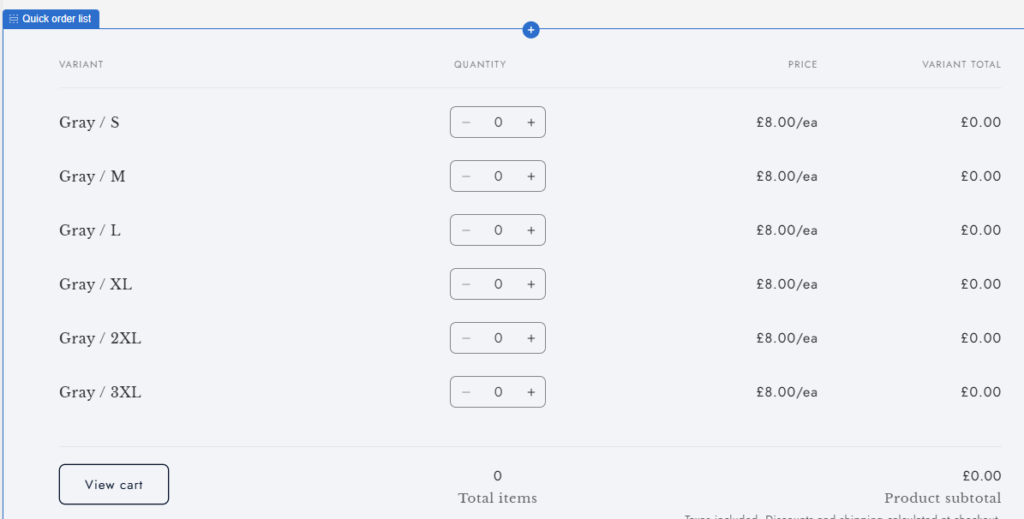
Shopify B2B order management now offers a Quick Order List section in Online Store 2.0 themes (v11+), allowing B2B customers to add multiple variants and quantities directly from the product page. This provides a native bulk-ordering workflow without requiring apps.
A quick order list provides an intuitive interface to view products, its variants and prices in a nice table where quantities can be selected and multiple variants in multiple quantities can all be added to the cart in one go.
Draft Orders for B2B
Draft orders in Shopify B2B Order Management is a way to capture and manage complex B2B orders.
Merchants and sales staff can create draft orders on behalf of customers or convert purchase requests received through phone, email, or offline channels.
Merchants can also require certain B2B customers to submit their online checkout orders as drafts for review before they become actual orders.
When buyers submit orders:
- they may see a “Submit for approval” checkout option
- they receive a draft order for review via email
- they can pay later based on their payment terms
- deposit requirements (if any) are clearly shown at checkout
Payment Terms, Deposits, Invoicing & Store Credit
Shopify B2B supports a full suite of billing and payment capabilities to mirror real enterprise purchasing behavior.
Invoices can be automatically generated and emailed to customers, and buyers can pay outstanding invoices anytime from their account dashboard.
When buyers check out, they:
- see their assigned payment terms
- see the required deposit amount (if applicable)
- can apply store credit to eligible orders
- can use the “Pay now” option to settle invoices at any time
This gives buyers full transparency into what they owe, when it’s due, and how to pay.
Vaulted Payment Methods (Credit Cards + Bank Accounts)
Shopify B2B allows buyers to securely store payment methods for faster checkout and easier invoice payments.
Depending on region and payment provider, buyers can vault:
- credit cards (via Shopify Payments)
- bank accounts for ACH debits (US-only)
Vaulted payment methods can be chosen at checkout or used later by the merchant to collect payment on pending invoices or draft orders.
This significantly reduces friction for repeat orders and simplifies collections for merchants.
Also read this article on how to create a high-converting B2B checkout on Shopify.
Staff Roles & Sales Rep Workflows
Shopify supports dedicated workflows for sales managers and sales representatives handling B2B accounts.
Sales staff can access customer information, pricing, products, and inventory to create accurate orders without leaving Shopify.
For buyers, this translates into:
- smoother offline-to-online order capture
- faster order entry
- better account management with reps who can act on their behalf

Extending Shopify B2B Order Management with Customer Accounts UI Extensions
While Shopify provides a strong foundation for B2B order management out of the box, many businesses need deeper customization to match the workflows their buyers are used to—especially when it comes to the customer portal. This is where Customer Accounts UI Extensions become one of the most powerful tools in the Shopify B2B ecosystem.
Customer Accounts UI Extensions let merchants add new functionality directly inside the B2B customer account experience without building a full custom storefront. Instead of forcing buyers to switch between portals or external systems, merchants can surface exactly the tools and information buyers need—right inside Shopify.
What You Can Build with Customer Account Extensions for Better Shopify B2B Order Management
Using UI extensions, merchants can embed custom components such as:
- Advanced reorder tools (saved SKUs, reorder frequency, multi-line reorder interfaces)
- PO upload workflows (CSV or Excel PO import mapped to Shopify products)
- Custom quote or draft-order dashboards
- Invoice and payment history synced from an ERP
- Store credit statements and credit limit usage
- Custom product recommendations for B2B buyers
- Contract details, special terms, or buyer-specific rules
- Support ticket widgets, warranty info, or service history

Conclusion – Shopify B2B Order Management Features Overview
Shopify B2B Order Management provides a strong foundation with companies and locations, custom catalogs, payment terms, draft orders, checkout controls, and seamless account experiences.
Layered with Functions, Flow automations, UI Extensions, and ERP integrations, Shopify can support even the most complex B2B order-management workflows.