Shopify Plus Multiple Stores Features and Limitations

In this article, we’ll discuss managing multiple Shopify Plus stores effectively using the platform’s multi-store management features. We’ll also cover best practices for multi-store management and some possible workarounds for the limitations and challenges you face when going global or operating separate storefronts.
Before we dive into Shopify Plus multiple stores features and limitations, let’s first look at the case scenarios in which you would want to operate multiple stores.
Common scenarios where operating multiple Shopify Plus stores makes sense
Below are the most common scenarios in which a Shopify Plus multi-store setup is the right approach.
- International expansion with deep localization, regional compliance, taxes, and legal requirements.
- B2C and B2B running side by side
- Product lines or sub-categories that need separation
Can you have multiple stores on one Shopify Plus subscription?
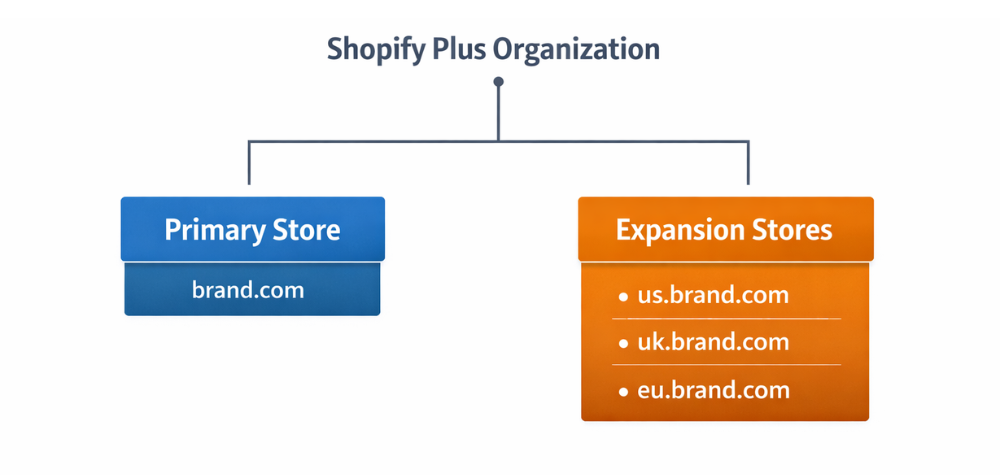
Yes — Shopify Plus supports multiple stores through Shopify’s Expansion Stores model. This allows merchants to operate multiple storefronts under a single Shopify Plus contract, all managed within one organisation.
But how many stores can you have on Shopify Plus?
Well, under a standard Shopify Plus subscription:
- You get one primary store
- Plus includes up to nine expansion stores by default
- All stores are managed from the Shopify Organisation Admin
This setup is designed to help brands scale across regions, customer segments, or business models while keeping high-level control centralized.
The one-brand rule (important to understand)
Shopify Plus operates on a one-brand-per-contract rule. This means all expansion stores must belong to the same brand family – for example:
- Regional stores (US, UK, EU)
- B2C and B2B versions of the same brand
- Segmented stores for VIPs, employees, or specific customer groups
If a company owns multiple unrelated brands, each brand requires its own Shopify Plus contract, even if they are managed under the same parent organisation.
This distinction is critical when planning a multi-store strategy, especially for groups managing portfolios of brands. Shopify Plus is built to scale one brand across multiple stores, not multiple brands under one subscription.
Next, we’ll examine the number of stores you can have on Shopify Plus, the built-in limits, and what happens when you need to scale beyond them.
What happens when you need more than 10 stores on Shopify Plus?
By default, a Shopify Plus contract includes one primary store and nine expansion stores, allowing you to manage up to 10 live production stores under a single subscription. This is the standard Shopify Plus limit for multiple stores.
In most cases, extra stores cost around $250–$300 per month per store, although the exact pricing depends on your contract and negotiations with Shopify.
For large enterprises or brands managing extensive regional or market-specific storefronts, Shopify may offer custom pricing or contract terms. This usually applies when:
- You operate a large number of regional stores
- You’re scaling rapidly into new markets
- You manage complex B2B, DTC, and POS setups under one brand
In these scenarios, store count, pricing structure, and billing models are often tailored during contract renewal or expansion discussions.
Shopify Plus multiple stores pricing: what you actually pay
Understanding Shopify Plus multiple stores pricing starts with knowing what’s included — and where extra costs come in.
Base pricing vs multi-store add-ons
Your Shopify Plus subscription includes one primary store, plus up to nine expansion stores, at no additional platform cost. Once you exceed that, additional stores are added to your contract and typically cost $250–$300 per store per month, depending on your specific agreement.
Hidden costs to plan for
This is where Shopify Plus billing for multiple stores adds up:
- Apps are usually billed per store
- Themes and customizations often need to be managed per store unless you use a shared codebase
- Integrations and middleware (ERP, PIM, WMS) are common in multi-store setups
- Localization costs like content, SEO, customer support, and regional marketing scale with every new store
The key takeaway: Shopify Plus covers the storefronts, but the real cost of running multiple stores comes from the ecosystem around them.
Shopify Plus multiple stores management: what you can manage centrally
One of the biggest advantages of Shopify Plus’ multi-store management is the ability to control key functions at the organizational level. That said, not everything is centralized—and understanding this split is crucial to running a scalable multi-store setup.
What Shopify Plus centralizes at the organization level
Shopify Plus provides an Organization Admin, which serves as the central control layer across all your stores.
At this level, you can centrally manage:
- Staff and permissions across all stores, using role templates to keep access consistent
- Security and governance, reducing risk as teams and regions grow
- High-level reporting, with summary views of performance across stores
This centralized layer enables leadership teams to maintain oversight without needing to log into each store individually.
What stays separate per store:
Despite the organization-level controls, Shopify Plus does not operate on a shared database model.
Each store still has its own:
- Products, customers, and orders, all stored separately
- Inventory, unless you connect an external system to act as a single source of truth
- Store settings, checkout logic, apps, and themes, which must be managed per store
This separation provides flexibility, but it also introduces duplication if you don’t plan for integrations and governance early.
One domain across multiple Shopify Plus stores?
In practice, Shopify Plus works with one primary domain per store. While stores can be connected from a user experience perspective, each storefront still operates independently behind the scenes.
The most common and supported domain structures are:
- Separate domains per store
Example: brand.com, brand.co.uk, brand.de
This is the most common and cleanest approach for regional expansion. - Subdomains
Example: us.brand.com, eu.brand.com
Often used when teams want a stronger connection to the main brand domain. - Subfolders
Example: brand.com/us or brand.com/eu
This setup is more complex and usually requires routing work, domain proxies, or a headless architecture. It’s possible, but rarely the simplest or cheapest option.
Where Shopify Plus falls short in multi-store — and how teams fix it
Shopify Plus excels at managing multiple storefronts, but it also introduces some challenges in operating multiple stores.
No native centralized product and inventory sync
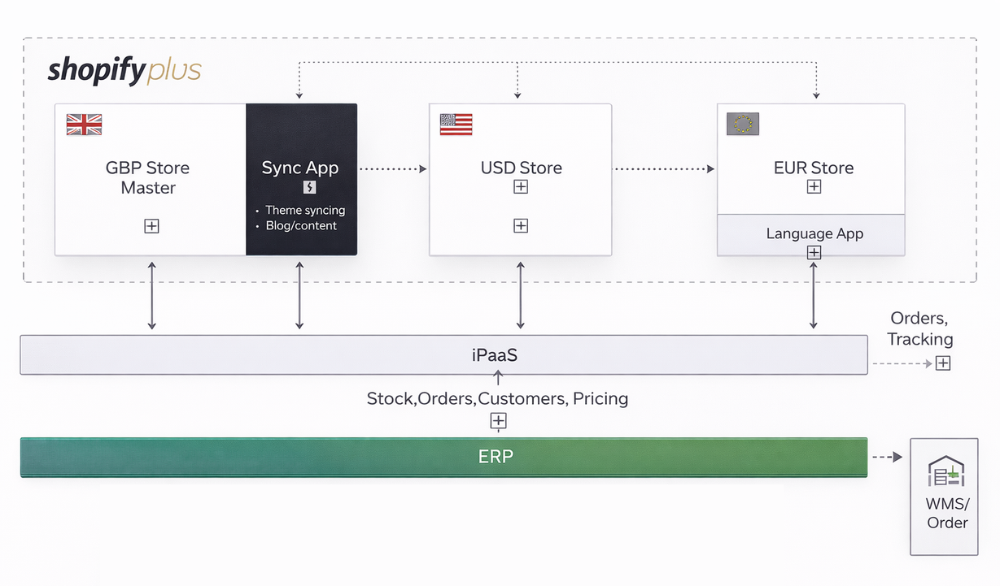
The gap: Products and inventory live at the store level. There’s no built-in way to manage a single catalog or stock pool across multiple stores.
How teams fix it:
- Use an ERP as the system of record for orders and inventory
- Add a PIM to manage product data and localization
- Use inventory tools or custom middleware to sync updates across stores
Reporting is fragmented across stores
The gap: Shopify reports are store-specific, with only limited org-level summaries.
How teams fix it:
- Send data from each store to GA4
- Centralize data in a warehouse
- Use BI dashboards to analyze performance across all stores
Apps and themes multiply fast
The gap: Apps and themes are licensed per store, which increases cost and maintenance effort.
How teams fix it:
- Negotiate enterprise pricing with app vendors
- Build private apps that serve multiple stores
- Maintain a shared theme repository with a controlled deployment process
Automations don’t run across stores natively
The gap: Tools like Shopify Flow are designed for single-store use.
How teams fix it:
- Use middleware to orchestrate actions across stores
- Centralize business logic and trigger store-level automations in sync
Multi-brand isn’t covered by one contract
The gap: Shopify Plus supports one brand per contract, not multiple unrelated brands.
How teams fix it:
- Use separate Shopify Plus contracts per brand
- Apply organization-level governance to standardize processes across brands
These limitations don’t make Shopify Plus unsuitable for multi-store setups — they just mean that successful multi-store operations rely on architecture, not just the platform.

Best practices for Shopify Plus multi-store management
Managing multiple stores on Shopify Plus becomes much easier when you treat it as a system — not a collection of separate storefronts. Below is a practical checklist teams use to stay scalable.
- Decide your store strategy first
Be clear on why you need multiple stores — such as regional expansion, B2B vs. DTC, segmentation, or compliance. Store count should follow strategy, not the other way around. - Create a single source of truth for product and inventory
Utilize an ERP or PIM to prevent product data and stock from drifting across stores. - Standardize theme architecture
Maintain a shared theme repository with controlled releases, rather than customizing each store independently. - Define app governance early
Decide which apps are global and which are store-specific to avoid cost and complexity sprawl. - Build cross-store analytics from day one
Consolidate data into GA4, a warehouse, or BI tool to get a true view of performance. - Plan SEO upfront
Define hreflang, canonical rules, and localization strategy before launching additional stores. - Set an automation strategy
Use Shopify Flow at the store level, backed by centralized triggers or middleware for alignment. - Standardize org-level roles and permissions
Use role templates to control access consistently across all stores. - Create repeatable store launch playbooks
Document the steps for launching new stores so expansion doesn’t become chaotic. - Keep brand consistency, but localize the experience
Maintain a unified brand identity while tailoring content, pricing, and messaging for each market.
Following these best practices helps ensure your Shopify Plus multi-store management setup stays efficient, predictable, and scalable as you grow.
Shopify Plus multi-store: when to bring in a partner and is it worth it?
Running multiple stores on Shopify Plus works well at a platform level, but long-term success depends on how well everything behind those stores is connected. This is typically the point at which teams benefit from collaborating with Shopify Plus partners who are experienced in multi-store management.
A good partner doesn’t just help you launch more storefronts; they also help you grow your business. They help you design a scalable system by:
- Architecting catalog and inventory sync across stores
- Defining a clear domain, SEO, and hreflang strategy
- Setting up theme governance and controlled deployments
- Building a central data and BI layer for cross-store visibility
- Helping you choose between Shopify Markets, expansion stores, or a hybrid setup
This kind of support prevents operational sprawl and reduces the cost of scaling later.
If you’re planning to scale with Shopify Plus and have multiple stores, and want to ensure your setup is built for growth, not rework, this is where the right guidance matters.
Talk to Codup. Our team helps brands design and implement scalable Shopify Plus multi-store architectures, encompassing store strategy, system integrations, SEO, data management, and governance. Get in touch with Codup to build a multi-store setup that actually scales with your business.